
Dumper
With Hypurr Fun, you can use the dumper feature to automatically sell tokens airdropped to your wallet. These are tokens that you purchased in the Hpump market and have successfully bonded on HyperCore.
From the dumper menu, you can:
- Create new configurations.
- Activate or deactivate existing configurations.
- Customize your settings to match your trading strategy.
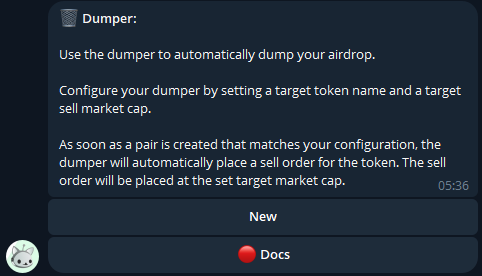
Creating a New Dumper Configuration
-
Access the Dumper Widget
- Use the
/dumpercommand to open the Dumper widget. - Press the “New” button to create a new configuration.
- Use the
-
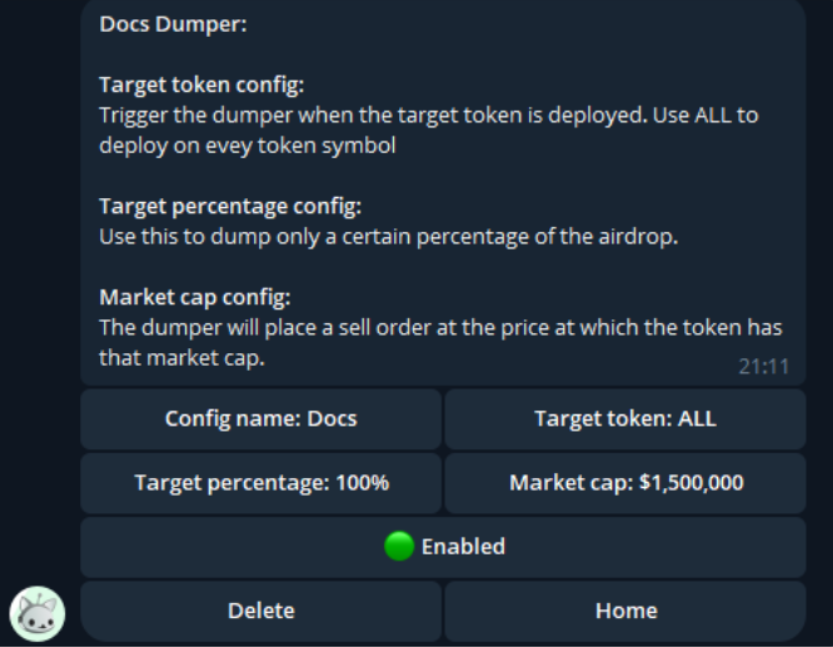
Name Your Configuration
- Enter a config name to identify your setup.
- The name is NOT the ticker of the token—it’s simply a label for differentiating between multiple configs.
.png)
-
Set Your Parameters
Configure the following settings for your Dumper:- Target Token:
Specify the ticker of the token you want to dump, or use “ALL” to sell every airdrop received. - Target Percentage:
Define the percentage of your airdropped tokens that you want to sell. - Market Cap Threshold:
Set the market cap (FDV) at which the Dumper will execute sell orders immediately after token deployment.
- Target Token:
-
Activate the Configuration
- Once all parameters are set, press the “Disabled” button to enable the configuration.
- The Dumper will now automatically execute as airdrops are received.
Why Use the Dumper?
The dumper feature is essential for automating the sale of airdropped tokens, saving you time and ensuring you can act quickly in dynamic markets. It’s especially useful for managing multiple tokens or maximizing gains from unexpected airdrops.